

Colorizing with Paint Shop Pro
Introduction
So what exactly is colorizing? Well, it's a simple effect to make your images look much prettier! It takes an image and turns the whole thing one colour, like this:
Before:

After:

What You Need
For this tutorial you're going to need the following programs:
~Paint Shop Pro
The Effect
First things first, you need an image. I've picked this one from the Neopets Background page:
Open the image up in Paint Shop Pro and press "Adjust" then "Hue and Saturation" and then "Colorize". Like this:

Once you've clicked it, a new window will pop up. You need to decide on a colour for your image, I've chosen green. Simple mess with the dials until you get the colour you want and then press "Ok".
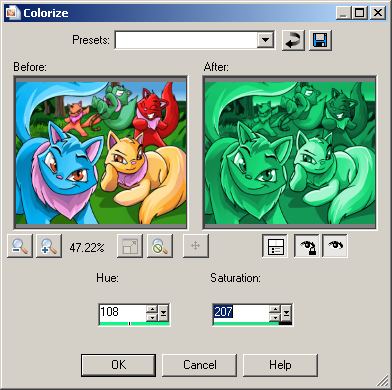
Et voila! You're complete!
Labels: colorizing, paint shop pro, tutorial
posted by Del @ 6:23 PM
0 Comments
